You unbox a new Windows 11 Pro laptop, run through the out-of-box experience, sign in with a work account, and the device joins Entra ID without complaint. Then you find the user has no local admin rights.
Worse, if you open the local Administrators group you’ll see a SID starting S-1-12-1... with a greyed-out question mark where a name should be. No name, no permissions, no way to elevate. Fully joined, fully unusable.
The problem
The first user to join a device to Entra ID used to be added to the local Administrators group automatically. Microsoft changed that default in newer tenants. The join itself still succeeds, but the admin assignment doesn’t happen, and what’s left behind is a SID Windows can’t resolve. The account clearly exists, since the user can sign in, but there’s nothing to elevate it with: no admin password, no way to install software, update drivers, or reset Windows from within the OS.
What causes it
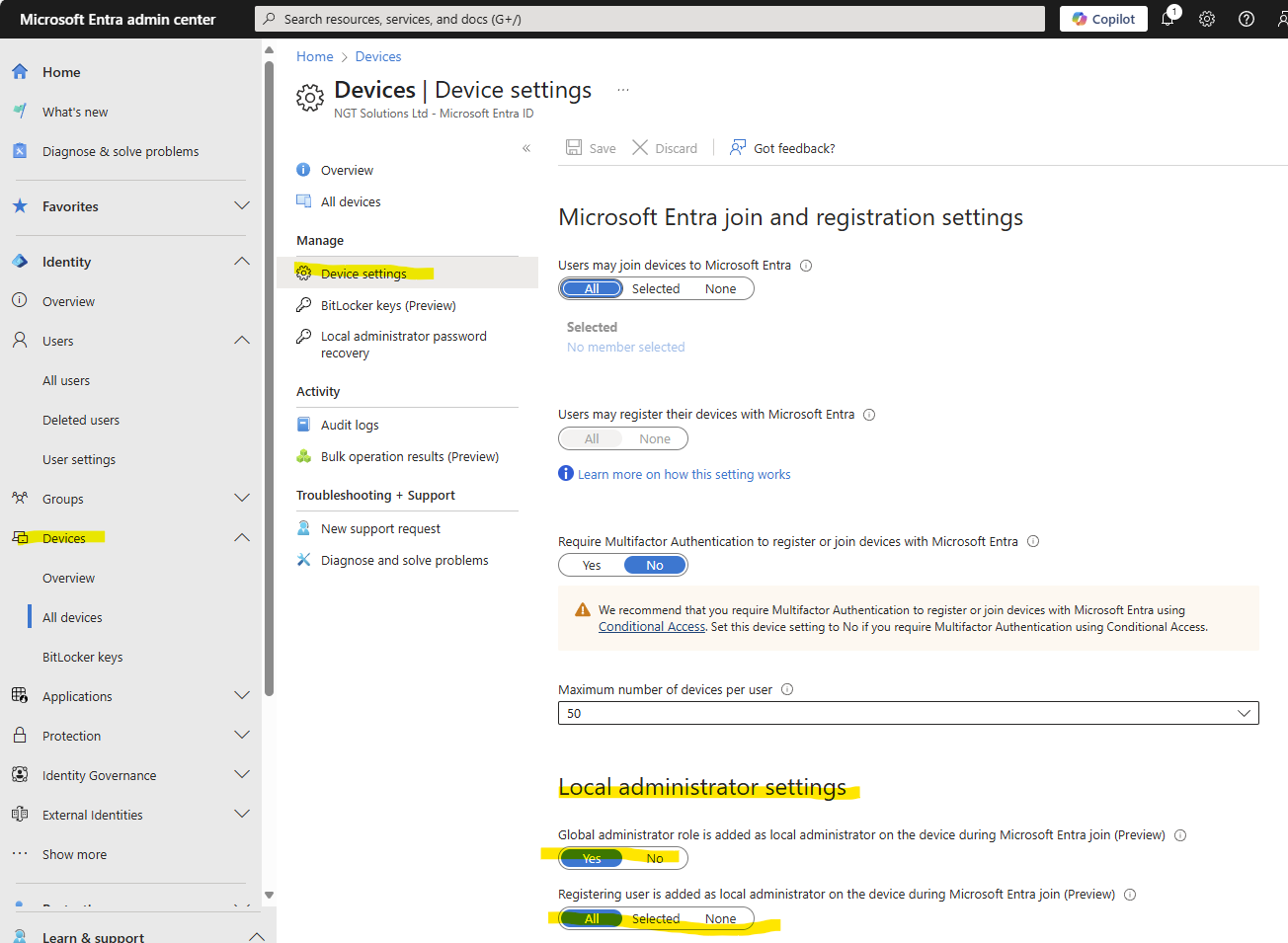
Almost always, it’s the device settings in Entra ID (or an Intune policy) not assigning local admin rights during join. Check it here:
Entra admin centre → Devices → Device settings → Local administrator settings
Set “Registering user is added as local administrator on the device during Microsoft Entra join” to All, and “Global administrator role is added as local administrator on the device during Microsoft Entra join” to Yes (handy as a fallback if the first setting ever gets misconfigured again).
Fixing a device already in this state
If a device has already joined with no admin user, there are two ways out.
Reset and rejoin. If you’re still early in deployment, Shift + Restart at the login screen → Troubleshoot → Reset this PC. Keep the device online throughout OOBE, and fix the tenant setting above first so the rejoin doesn’t repeat the problem. If BitLocker is on, confirm the recovery key is already in Entra ID before you wipe.
Fix it remotely via Intune, if wiping isn’t an option. Push a script through Endpoint Manager → Devices → Scripts:
Add-LocalGroupMember -Group "Administrators" -Member "AzureAD\user@domain.com"The takeaway
Nothing here is broken so much as reconfigured: Microsoft tightened the default, and a device that looks fully provisioned can still be missing the one thing that makes it usable. Worth checking the device settings before you roll out a new deployment profile, rather than after the first support call.